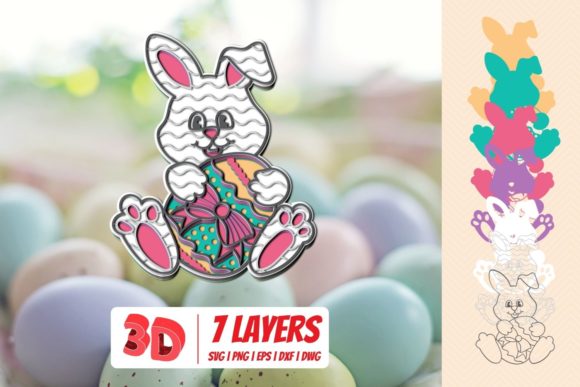
3D Easter Bunny – More Than Just a Seasonal Decoration
If you've searched for "3D Easter Bunny" recently, you've likely seen everything from printable STL files to pre-colored figurines and digital models for animation. It's a small phrase that covers a surprisingly wide world of possibilities. Whether you're thinking about decorating your home, starting a small side hustle, or looking for a fresh classroom activity, the 3D Easter Bunny offers more flexibility than the typical store-bought chocolate rabbit. Let's look at where it really shines and what you should keep in mind before jumping in.
Where a 3D Easter Bunny Makes a Real Impact
Instead of focusing on what a 3D Easter Bunny is in technical terms, it's more useful to think about the situations where it becomes genuinely helpful. These aren't hypothetical scenarios; I've seen people use them in ways that save money, spark creativity, and even open up unexpected revenue streams.
Home Decor That Actually Feels Personal
You can walk into any store in March and find a dozen mass-produced bunnies. But a 3D printed Easter Bunny lets you choose the size, the color, the material, and even the expression. Want a life-sized bunny for the front porch? You can scale the model yourself. Prefer a matte finish that looks like ceramic? Certain filaments or resin treatments achieve that look easily. People I know have printed multiple bunnies, painted them to match their living room palette, and created a centerpiece that fits their style, not the store's.
Small Business & Etsy Sellers
The market for unique handmade items is strong, and 3D printed Easter Bunnies fit perfectly into that space. Sellers can offer ready-to-ship painted bunnies, raw prints for DIY customers, or even digital files for those who want to print their own. The key advantage here is speed and repeatability. If a popular bunny design sells out, you can produce another batch overnight. One seller I spoke with creates multi-color layered bunnies using a filament swap technique and sells them at local craft fairs for $15–$30 each, depending on size. The same file can be reused year after year, which is a huge plus over seasonal products that require new molds or tooling.
Schools, Youth Groups, and Educational Settings
Teachers have found the 3D Easter Bunny to be a natural fit for STEM lessons. Printing a bunny from a pre-designed file teaches students about slicing software, support structures, and layer adhesion. But it also works for art classes where kids can paint and decorate their own prints. I've seen a middle school class design their own bunny variants using Tinkercad, then print them as part of a unit on 3D modeling. It turns a holiday theme into a practical lesson on design thinking. For youth groups or church events, printing a batch of small bunnies for an Easter egg hunt prize is cost-effective and memorable.
Content Creators and Digital Marketers
If you produce social media content or marketing materials, a 3D model of an Easter Bunny can be a versatile asset. You can render it in any scene, animate it, or use it as a character in a short video. Brands creating Easter promotions often need custom graphics, and having a 3D model means you're not limited to photos of physical objects. One freelance designer I know used a free 3D Easter Bunny model to build an augmented reality filter for Instagram – users could place a virtual bunny next to themselves. It was cheap to produce and drove engagement during the holiday week.
Event Planners and Party Organizers
Custom centerpieces, photo booth props, and table numbers can all incorporate 3D printed bunnies. The ability to scale them up or down for different tables, add names or dates on the base, or mix materials (like printing a bunny that holds a real mini egg) gives event planners a lot of creative freedom. For corporate Easter events, a branded bunny with a company logo on its base can be a subtle yet effective giveaway.
Different Ways Different People Use the 3D Easter Bunny
The same file can serve very different purposes depending on who is using it.
- The hobbyist 3D printer enthusiast often spends time tweaking settings, trying different filament types (silk PLA, marble, glow-in-the-dark), and painting the final print. For them, the 3D Easter Bunny is a fun project that lets them practice new finishing techniques, like sanding and applying primer. Some even remix the original design by adding accessories or changing the pose.
- A parent or caregiver might simply want a cheap, personalized Easter gift. Printing a bunny in the child's favorite color or with their name on the base takes only a few hours of print time and costs a dollar or two in filament. It becomes a keepsake that lasts far longer than chocolate.
- A graphic designer or illustrator often uses a 3D Easter Bunny model as a reference for drawing or to composite into holiday flyers. Instead of hunting for stock photos, they can render the bunny from any angle and tweak the lighting to match their design.
- A small business owner views the 3D Easter Bunny as a product to sell. They evaluate the cost per print, time investment, and market price. They might offer different sizes or finish options. Many sell both the physical item and the digital file, which opens up a passive income stream with no inventory.
Practical Considerations Before You Download or Buy
Not every 3D Easter Bunny file is ready to print flawlessly. Here are some things to keep in mind based on common experiences.
File Format and Printer Compatibility
Most files are in STL format, which works with almost any FDM or resin printer. But some are designed specifically for resin printers (high detail, small size) while others are meant for FDM (larger, sturdier). Check the model description. If you have an FDM printer, look for files with visible layer lines in the preview – those usually print well. Models with tiny overhangs or very thin ears may need supports, and that can affect the surface finish.
Licensing Matters – Especially for Commercial Use
Many free 3D Easter Bunny models come with a personal use license only. If you plan to sell the prints or the digital file itself, you need a commercial license. Some creators on platforms like Cults3D or MyMiniFactory offer commercial licenses for a small fee. Ignoring this can lead to takedown notices, so it's worth checking before you start selling.
Scale and Print Time
A bunny that looks small on screen may take eight to ten hours to print at a decent resolution. If you're printing multiple, that adds up. I've seen people misjudge scale and end up with a six-inch bunny when they wanted a three-inch one. Most slicers let you resize, but always check the dimensions before hitting print. Also, larger prints often need more infill and thicker walls, which increases material usage.
Post-Processing
A raw print straight off the bed usually has layer lines and maybe a few support scars. Sanding, filling, and painting can turn it into a beautiful object, but that takes time and materials. If you're selling, factor that labor into your pricing. If you just want a quick decoration, consider using a filament with a smooth finish or a resin printer for more detail right out of the box.
Alternatives to 3D Printing
Not everyone has access to a printer. Fortunately, the phrase "3D Easter Bunny" also applies to papercraft templates (3D models intended for cutting and folding) and even some augmented reality apps that place virtual bunnies in your space. If you're unsure about the investment in a printer, those alternatives let you experiment with the concept for nearly zero cost.
Strengths and Limitations at a Glance
The biggest strength of a 3D Easter Bunny is customization – you can make it exactly how you want. That same customization also means you can reproduce it endlessly, which is great for businesses or events. The digital file never wears out, so you can print the same design next year without searching again.
On the flip side, the need for a 3D printer is the most obvious limitation. While printers have become much cheaper and more reliable, there's still a learning curve. Filament costs are low, but time is not. A single failed print can waste several hours and a small amount of material. Additionally, the aesthetic of a 3D printed object isn't everyone's taste – some people prefer the smoothness of injection-molded plastic or the charm of handcrafted items. For those situations, a 3D Easter Bunny might feel too "mechanical."
Real Examples We've Seen
At a local Easter market last year, a vendor printed about forty bunnies using glow-in-the-dark PLA. She sold them as nightstand decorations for kids who are afraid of the dark. The glowing effect was a huge hit, and she sold out by noon. That's a use case that traditional plastic bunnies can't replicate easily.
I also know a math teacher who used a 3D Easter Bunny model as part of a lesson on volume and scaling. Students measured the printed bunny, then calculated how much material was used based on the infill percentage. It turned a holiday symbol into a hands-on math tool, and the kids actually looked forward to measuring things.
On the digital side, a small chocolate brand used a royalty-free 3D Easter Bunny in an animated Instagram post. They rotated the bunny, added a shadow, and overlaid text for their sale. The post took less than an hour to make and cost nothing beyond the subscription to a 3D asset library. It performed better than their photo-based posts that year.
The 3D Easter Bunny is far more versatile than its simple name suggests. Whether you're printing one for your mantle, selling a dozen at a craft fair, or just playing with digital design, it's a practical way to make the holiday a bit more personal and a lot more fun.