ICE 3D Text Effect Mockup PSD: A Practical Evaluation for Designers
When you need a frozen, crystalline look for typography, few options offer the immediate visual impact of a dedicated mockup. The ICE 3d Text Effect Mockup PSD is a layered Photoshop template designed to turn any text into a realistic ice sculpture. Instead of building the effect from scratch, you paste your words into a smart object layer, and the PSD renders them with frost, reflections, and three-dimensional depth. This article evaluates what the file actually delivers, when it makes sense to use it, and where alternatives may serve you better.
What Is an ICE 3D Text Effect Mockup PSD?
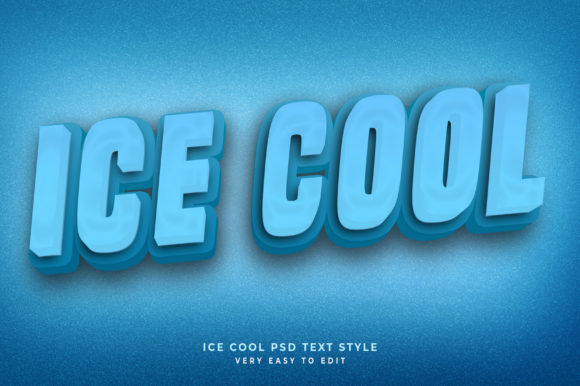
A PSD mockup is a pre-built Photoshop document that simulates a real-world surface or material. In this case, the ICE 3d Text Effect Mockup PSD takes any text you supply and applies layer styles, displacement maps, and lighting effects to make it look like carved, glossy ice. The result is a 3D-looking letterform with highlights, shadows, and internal refraction typical of frozen water. Usually the file includes one or more camera angles, a background, and a dedicated smart object layer for the text. The user double-clicks the smart object, types the desired word, saves, and the mockup updates automatically.
Why Designers Consider This Mockup
Interest in ice text effects often arises from seasonal projects, product packaging, gaming interfaces, or beverage branding. A polished ice mockup can save hours of manual layer work and deliver a level of photorealism that would be difficult to replicate without extensive 3D modeling. The ICE 3d Text Effect Mockup PSD appeals to anyone who needs a quick, credible frozen type treatment without learning rendering software.
Typical use cases include:
- Winter holiday social media headers
- Mockups for frozen food or drink labels
- Game UI elements set in arctic environments
- Event posters for ice skating, winter sports, or fridge campaigns
- Promotional graphics for cold-chain or refrigeration services
Real Benefits of Using the Mockup
Speed and convenience are the primary advantages. With the smart object workflow, you can generate multiple iterations of ice text for different clients or products in minutes. The layer effects are already tuned so you do not have to experiment with bevel, emboss, gradient overlays, and drop shadows. Additionally, the file usually comes with organized layer groups and non-destructive adjustments, allowing you to tweak settings like ice color, intensity, and background without breaking the effect.
Photorealism is another strong point. A well-made PSD mockup simulates refraction and reflection more convincingly than most pure Photoshop filter stacks. The ICE 3d Text Effect Mockup PSD often includes multi-layered highlights and subtle chromatic aberration that mimics the way real light passes through ice. For presentations or social posts, this realism communicates quality without requiring a 3D license.
Consistency across a set of graphics is easier to maintain because the mockup enforces the same lighting, material, and perspective. If you produce a series of frozen-text banners, each one will match the others, which is harder to guarantee when you hand-build each graphic.
Tradeoffs and Limitations
Every PSD mockup comes with constraints. The ICE 3d Text Effect Mockup PSD is not a flexible 3D model; it is a 2D composite with depth faked through shading. If you need to rotate the text or view it from different angles, you are limited to the views provided in the file. Some mockups include only one front-facing angle, which can feel restrictive if your layout demands a different perspective.
File size and performance can be an issue. High-resolution PSDs with many adjustment layers and embedded smart objects may become large, slowing down Photoshop on older machines. You might need to work with 16‑bit color depth for smoother gradients, which further increases memory use.
Learning curve with smart objects is minimal, but beginners sometimes replace the wrong layer or forget to save the smart object, resulting in missing text. The file requires Adobe Photoshop—no alternative software is supported. If you work in Affinity Photo, GIMP, or Canva, you cannot directly edit the smart object and may lose important layer styles.
Customization depth varies. Many ice mockups allow you to change the color tint of the ice (blue‑white, clear, or slightly turquoise) and the background, but you cannot radically alter the geometry of the letters. The text keeps its own typeface, but the ice effect applies a generic 3D extrusion based on the PSD’s layer style setup. For highly specific text shapes, the result may look manufactured rather than hand‑carved.
When the ICE Mockup Is a Strong Fit
This type of mockup shines in scenarios where repeatability and speed are more important than absolute creative control. For example, a social media manager who needs ten winter promotion banners can produce them all in a single afternoon using the ICE 3d Text Effect Mockup PSD. Similarly, a packaging designer creating a cold‑beverage label can use the mockup for initial client presentations, showing a polished ice effect without investing days in 3D modeling.
It is also a good fit for non‑designer stakeholders who need to visualize text on a product. With basic Photoshop skills, a marketing coordinator can swap text and output a render for a webinar slide or email header. The reduced dependence on a dedicated visual designer can speed up early iterations.
If the project demands a photorealistic frozen aesthetic but the budget or timeline does not allow a custom 3D render, a high‑quality PSD mockup is a pragmatic middle ground.
When Alternatives Are Worth Considering
If you need full rotational freedom, true three‑dimensional lighting, or animation, the PSD mockup will not suffice. In those cases, a 3D program like Blender, Cinema 4D, or Dimension is necessary. You can model ice materials with subsurface scattering, create reflections, and animate a camera fly‑through. The tradeoff is time: generating a polished render from scratch takes hours or days, and the software has a steep learning curve.
Vector ice effects, such as those made in Adobe Illustrator, offer sharp, scalable graphics that work for large‑format printing without pixelation. However, they look less photorealistic than a raster PSD mockup. For signage or billboards where ice realism is less critical but crispness is paramount, an Illustrator workflow may be better.
Another alternative is online mockup generators or Canva templates. These provide preset ice text effects with no software installation, but customization is severely limited. You cannot fine‑tune the lighting, color, or reflections to match a specific brand palette or product photo. The ICE 3d Text Effect Mockup PSD offers more control than a web tool, but less than a full 3D application.
Practical Decision‑Making Insights
Before purchasing or downloading such a mockup, evaluate the following factors:
- Your image output requirements
Do you need very high resolution for print, or is 1920×1080 sufficient for digital? Check the PSD’s dimensions and whether it supports 300 DPI. - Number of text variations
For a large batch of different words, the smart object workflow will save significant time. For one‑off projects, you might be fine building the effect manually or using an online tool. - Integration with your brand colors
Can the mockup’s ice tint be adjusted to match your brand’s cool tones? Most files allow color overlays, but confirm before purchase. - Software environment
If you use Photoshop regularly, the mockup integrates seamlessly. If you rely on other applications, look for a template compatible with your chosen program or accept the need to convert. - Client or audience expectations
A PSD mockup looks polished on a screen but may not hold up under extreme magnification. For print collaterals, test a low‑resolution export at actual size first.
Consider whether the ICE 3d Text Effect Mockup PSD aligns with your primary goal: speed or custom control. If speed wins, the mockup is likely a strong investment. If you require control over every facet of the ice material, invest time in 3D modeling instead.
Final Considerations
No single tool fits every project. The ICE 3d Text Effect Mockup PSD occupies a specific niche: it delivers convincing frozen typography quickly, with minimal technical overhead, for formats where one static view is acceptable. It is not a substitute for a full 3D pipeline, nor does it pretend to be. By understanding exactly what the mockup can and cannot do, you can decide whether it aligns with your workflow, timeline, and creative standards.
If your next deliverable calls for ice‑cold letters and you operate within Photoshop, evaluating a dedicated PSD mockup is a practical step. The tradeoffs are clear, and the time saved often outweighs the lack of full 3D interactivity. For projects that demand more, the alternatives exist—just be prepared for a longer process. Make your choice based on the specific needs of the brief, not on the allure of a shiny effect. With a clear assessment, the ICE 3d Text Effect Mockup PSD can be a reliable asset in your design toolkit.